How to Pay Using BRI QRIS Through the BRImo App: A Complete Guide

Paying with BRI QRIS has become increasingly popular thanks to its speed and convenience. QR code payments continue to gain traction because they offer a practical way to complete transactions.
QRIS, or Quick Response Code Indonesian Standard, is a QR code-based payment standard developed by Bank Indonesia in collaboration with various companies under the Indonesian Payment System Association (ASPI).
This system aims to make payments easier for Indonesians. Users only need to scan one QR code without worrying about which payment application they use.
With BRI QRIS, you can also enjoy faster, safer, and more efficient transactions. Want to know how to pay using BRI QRIS? Let’s explore the easy steps below!
What Is QRIS and Why Choose BRI QRIS?
QRIS is a QR code-based payment system that makes cashless transactions easier. With QRIS, you only need one QR code that can be scanned using various digital payment applications, such as GoPay, OVO, DANA, LinkAja, and, of course, BRImo from Bank BRI.
Before QRIS was introduced, each payment application had its own QR code, which often confused customers and business owners. QRIS brings different payment applications together under one standardized QR code, making transactions more convenient.
BRI QRIS is designed to provide greater convenience for both BRI customers and merchants. With BRImo, QRIS transactions are easy to complete at physical stores and other locations that accept QRIS payments.
Why Pay Using BRI QRIS?
There are several reasons why paying with BRI QRIS through the BRImo app is a great choice for both customers and business owners. Convenience, security, and ease of use are among the main factors driving the growing popularity of this payment method. It not only simplifies everyday transactions but also offers various benefits to users.
With QRIS, you can enjoy several advantages that make transactions easier without compromising convenience. Here are some of the key benefits of using BRI QRIS.
- Convenience and Speed
QRIS payments are fast and practical. Simply scan the QR code displayed by the merchant to complete your transaction in seconds. There is no need to carry cash or credit cards; all you need is your phone with the BRImo app. - Enhanced Security
Integrated security features, such as PINs and biometric authentication (fingerprint or facial recognition), help protect transactions. BRI QRIS also uses encryption technology to help safeguard transaction data. - Compatible with Various Payment Applications
QRIS supports payments through various integrated payment applications. Payments are not limited to BRImo; you can also use applications such as OVO, GoPay, DANA, and others. - Automatic Transaction Records
Every QRIS transaction is recorded automatically, making it easier to manage expenses and monitor financial activity without having to record everything manually. - No Need to Carry Cash
One of QRIS’s main benefits is reducing dependence on cash. With BRI QRIS, you can make payments at various locations without worrying about carrying cash or finding an ATM.
How to Pay Using BRI QRIS Through BRImo
Using BRImo to make QRIS payments is simple and convenient. Follow these steps to pay using QRIS:
1. Download and Install the BRImo App
First, download the BRImo app to your phone. It is available on the Google Play Store and Apple App Store. Once installed, open the application and log in using your BRI account.
2. Open the Payments Menu
After logging in, select the “Payments” menu on the BRImo home screen. Within this menu, you will find the QRIS transaction option.
3. Scan the QR Code
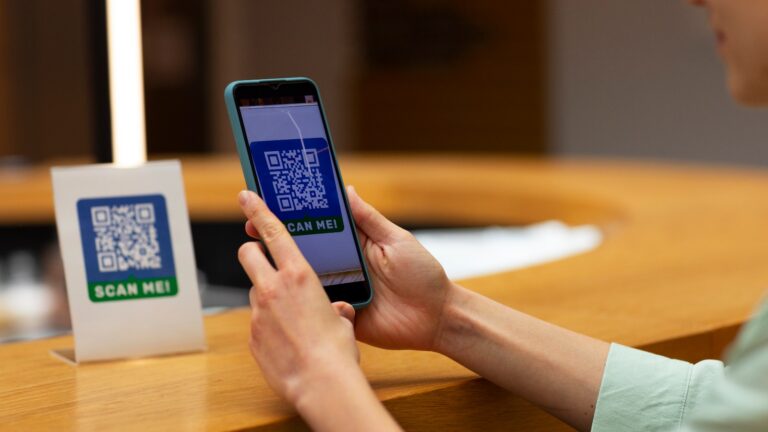
Next, BRImo will automatically activate your phone’s camera to scan the QR code provided by the merchant or business you are visiting. The merchant typically displays the QR code at the cashier counter or another location easily accessible to customers. Point your camera at the code to scan it.
4. Enter the Payment Amount
Once the QR code has been scanned successfully, BRImo will display the amount to be paid. Make sure the amount matches your bill before proceeding to the confirmation stage.
5. Confirm the Payment and Complete the Transaction
At this stage, BRImo will ask you to enter your PIN or use biometric authentication, such as fingerprint scanning or facial recognition, to complete the transaction. After confirmation, the payment will be processed, and you will receive a notification confirming that the transaction was successful.
By following these steps, you can easily pay using BRI QRIS through BRImo.
Benefits of Using QRIS
Beyond the convenience mentioned above, there are several additional benefits to using QRIS payments.
1. Time Efficiency
QRIS shortens the payment process. Customers simply scan the QR code, verify the transaction, and complete the payment in seconds.
2. Wider Accessibility
QRIS allows users to make payments at various locations that accept QRIS through participating payment providers. It can be used not only at physical stores but also on online platforms.
3. Potential Cost Savings
Many QRIS transactions do not incur additional fees for customers, although applicable charges may vary depending on the transaction type and payment provider. This can help customers and businesses save on costs associated with other payment methods.
4. Contactless Payments
Since the COVID-19 pandemic and the transition to the new normal, cashless transactions such as QRIS have been encouraged to reduce direct contact. By scanning a QR code, you can make payments without physical contact, offering a more convenient payment experience.
Tips for Business Owners Using QRIS
For business owners looking to optimize QRIS payments at their establishments, a few simple steps can make the system more effective.
First, make sure customers know that you accept QRIS payments by displaying a clear sign or sticker at the cashier counter or another visible location. This small step can make customers more comfortable choosing cashless payments.
If you use a digital point-of-sale (POS) system, consider integrating it with your QRIS payment system so transactions can be recorded automatically without manual processing. This integration helps speed up payments and minimize recording errors.
Additionally, make it a habit to review transaction reports regularly. Since QRIS payments are recorded automatically, you can easily monitor cash flow and verify that all payments have been received correctly.
With BRI QRIS, you have a fast, convenient, and secure payment solution for both customers and business owners. Through the BRImo app, you can pay at various participating merchants in just seconds.
Beyond simplifying transactions, this system also helps small and large businesses move toward more modern and transparent financial recordkeeping.
However, for businesses looking to offer more payment options, QRIS is just the beginning. With Paylabs, you can integrate various payment methods, including QRIS, debit and credit cards, virtual accounts, and e-wallets, into one secure and efficient system.
Paylabs helps businesses deliver a more comprehensive and professional payment experience without the hassle of managing multiple payment channels separately.
Download BRImo today to enjoy the convenience of QRIS payments. If you want to develop a more flexible digital payment system for your business, contact the Paylabs team at marketing@paylabs.co.id!